Private offer · available to HuntStack customers

HuntStack Triage Verdict Agent

Autonomous triage verdicts for Microsoft Sentinel, powered by HuntStack follow-up hunts

Every HuntStack incident gets a true-positive, false-positive, or needs-analyst verdict with next steps — unattended, before an analyst opens it.

[ DESIGNED FOR ]

Designed for teams running HuntStack-deployed Microsoft Sentinel analytic rules. Every HuntStack rule ships with its own follow-up hunt queries; the Triage Query Runner playbook executes them and posts the results to the incident, and this agent reads that evidence and issues the verdict. Customers without Security Copilot simply don't deploy it — the runner is unchanged.

live // HUNTSTACK_TRIAGE_VERDICT.describe()

What it
actually does

> Three-paragraph technical brief. No marketing fluff. Read top to bottom — it walks the agent's job from input to output.

  1. [ OVERVIEW ] 01 / 03

    HuntStack Triage Verdict Agent is the judgment layer on top of HuntStack's Sentinel detections. Every analytic rule HuntStack deploys ships together with the follow-up hunt queries that corroborate it, and the HuntStack Triage Query Runner executes those hunts the moment the rule fires — posting each hunt's query and results to the incident as a comment. That evidence gathering is deterministic KQL against Microsoft Defender XDR Advanced Hunting: it costs no Security Copilot compute. This agent reads that pre-gathered evidence and does the one thing that genuinely needs judgment — decides what it means.

  2. [ HOW IT RUNS ] 02 / 03

    The agent runs unattended. When the runner finishes posting evidence, the HuntStack Triage Verdict playbook fires on the comment event, claims the incident so it can only ever be judged once, hands the hunt results to the agent, and posts the returned verdict straight back to the incident. Nobody has to open a console or type a prompt. Analysts can also reach the same agent in Security Copilot chat — asking for a verdict on a specific incident, or using its 67-skill toolkit to investigate any user, device, IP, file or email.

  3. [ DELIVERABLE ] 03 / 03

    Each run returns a machine-readable verdict on the first line — true-positive, false-positive, or needs-analyst, with confidence, reasoning and concrete next steps — followed by a plain-language summary written for the analyst who opens the incident. A hunt that failed to run is treated as unknown, never as exculpatory, and evidence that is missing or unreadable yields needs-analyst rather than a guess. After a true-positive or needs-analyst verdict the agent goes one step further and checks whether the attacker kept access: newly registered devices, rogue app and service-principal changes, consent grants, mailbox forwarding rules, exfiltration signals, and endpoint persistence such as run keys, services, startup folder drops, scheduled tasks and WMI subscriptions.

// end.report | sections: 3 | chars: 1,915 current build

Capabilities

HUNTSTACK_TRIAGE_VERDICT.skills[]

67 triage & investigation skills,
organized into 9 packs.

A built-in library of read-only triage and investigation skills, grouped into the packs below. The agent invokes them inline — analysts never write the underlying KQL by hand. Every skill reads; none of them change anything in Sentinel or Defender.

cat 01
[ VERDICT-EVIDENCE ]

Verdict Evidence

Reads Sentinel incident state, the runner's follow-up hunt comments, and the accounts and devices in scope.

e.g.

Evidence, exactly as gathered

Pulls the follow-up hunt results the runner already posted — hunt name, query and rows — so the verdict rests on evidence you can read yourself on the incident.

skills 05
cat 02
[ ALERT-INTAKE ]

Alert & Detection Intake

Alerts across endpoint, identity, email and cloud apps, plus whether Defender already blocked the threat.

e.g.

Did Defender already handle it?

Checks antivirus detections, AMSI triggers, attack-surface-reduction events and tampering attempts — so a threat that was already blocked never reads as an open one.

skills 11
cat 03
[ ENTITY-CONTEXT ]

Entity Context

Device posture and vulnerabilities, user role and sign-in history, file reputation and signer trust, IP activity.

e.g.

One view of an entity

Answers the first question an L1 analyst asks about any device, user, file or IP — health, exposure, who used it, what it touched — without opening four portals.

skills 11
cat 04
[ IDENTITY-TRADECRAFT ]

Identity & Sign-In Tradecraft

Password spray, MFA fatigue, risky and new-country sign-ins, brute force, directory changes, and AD reconnaissance.

e.g.

Spray and fatigue, named

Separates one IP grinding a wrong password across many accounts from a genuine lockout, and catches MFA prompt-bombing that ends in a success.

skills 08
cat 05
[ IDENTITY-PERSISTENCE ]

Identity Persistence Checks

Newly registered devices, app and service-principal changes, consent grants, mailbox rules, exfiltration signals.

e.g.

Did they keep the account?

Run after an identity verdict: the registered device, rogue consent grant or quiet forwarding rule an attacker leaves behind to stay in after the password reset.

skills 05
cat 06
[ ENDPOINT-PERSISTENCE ]

Endpoint Persistence Checks

Registry run keys, service installs, startup-folder drops, scheduled tasks, and WMI event subscriptions.

e.g.

Did they keep the host?

Run after an endpoint verdict: the autorun mechanisms that survive a reboot and quietly re-establish access once the incident is closed.

skills 05
cat 07
[ EMAIL-PHISHING ]

Email & Phishing

Sender history and authentication, campaign blast radius, URL clicks, inbox and forwarding rules, ZAP outcomes.

e.g.

Who else got it, and who clicked

Scopes a phishing campaign to every recipient of the same message, shows who clicked through, and confirms whether auto-purge actually pulled it back.

skills 06
cat 08
[ EXECUTION-NETWORK-EVASION ]

Execution, Network & Evasion

Process ancestry, encoded PowerShell, parent-child mismatches, C2 beaconing, defence tampering and ransomware indicators.

e.g.

Beaconing that looks like nothing

Finds the low-and-slow repetitive callbacks that never trip a single-event rule, with the process and command line that made them.

skills 09
cat 09
[ IOC-LATERAL ]

IOC Pivots & Lateral Movement

Indicator sweeps across all telemetry, attachment tracing, related hosts, remote-execution tooling and logon fan-out.

e.g.

Blast radius from one indicator

Takes a single hash, IP or domain and finds every other host and account that touched it — turning one alert into the real scope.

skills 07
Want the full skill list?

We walk through the complete catalog — every skill, live, against real telemetry — in a demo.

Book a demo
// catalog.summary categories: 9 total: 67 skills Full skill catalog available in a live demo.

[ INSTALLATION ]

Install & configure in Microsoft Security Copilot

HuntStack Triage Verdict Agent is a private LockBase offer — it isn't listed in the public Microsoft Security Store. LockBase shares it into your tenant, where it appears in Microsoft Security Copilot as a private plugin you enable and point at your Sentinel workspace. Because the agent only judges the evidence HuntStack's playbooks gather, the HuntStack Sentinel content and its two playbooks are deployed first.

Requires the HuntStack Sentinel content. This agent judges the follow-up hunt evidence that HuntStack's analytic rules and Triage Query Runner produce. Without them there is nothing for it to judge.

  1. 01

    Deploy the HuntStack analytic rules

    From the HuntStack platform, push the analytic rules you want triaged into the customer's Sentinel workspace. Each rule carries its own follow-up hunt queries, so no extra configuration is needed per rule.

  2. 02

    Deploy the Triage Query Runner playbook

    Deploy the runner and its automation rules. When a HuntStack rule fires, it executes that rule's follow-up hunts against Defender XDR Advanced Hunting and posts one comment per hunt to the incident. This step alone works without Security Copilot.

  3. 03

    Open the plugin manager in Security Copilot

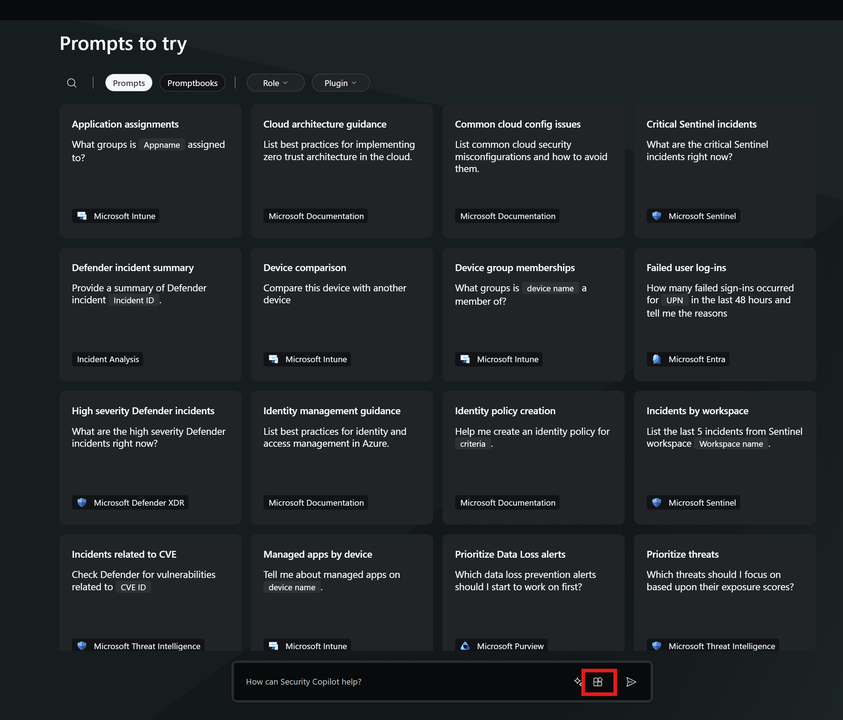
    Once LockBase has shared the private offer into your tenant, open Microsoft Security Copilot, go to the home screen, and select the plugins icon in the prompt bar (highlighted below). This opens the list of agents and plugins available in your workspace.

    Microsoft Security Copilot home screen with the plugins button highlighted in the prompt bar
  4. 04

    Enable HuntStack Triage Verdict Agent and open its settings

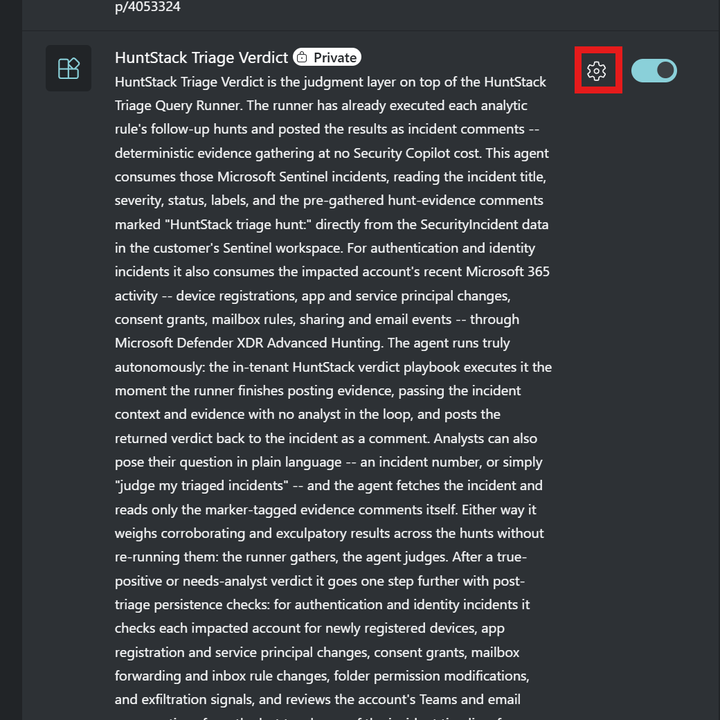
    Find HuntStack Triage Verdict Agent in the plugin list — it carries a Private badge because it's a LockBase private offer, not a public store listing. Switch the toggle on, then select the gear icon next to it to open the agent's configuration.

    HuntStack Triage Verdict Agent entry in the Security Copilot plugin list showing a Private badge, the toggle enabled, and the gear icon highlighted
  5. 05

    Point the agent at your Sentinel workspace

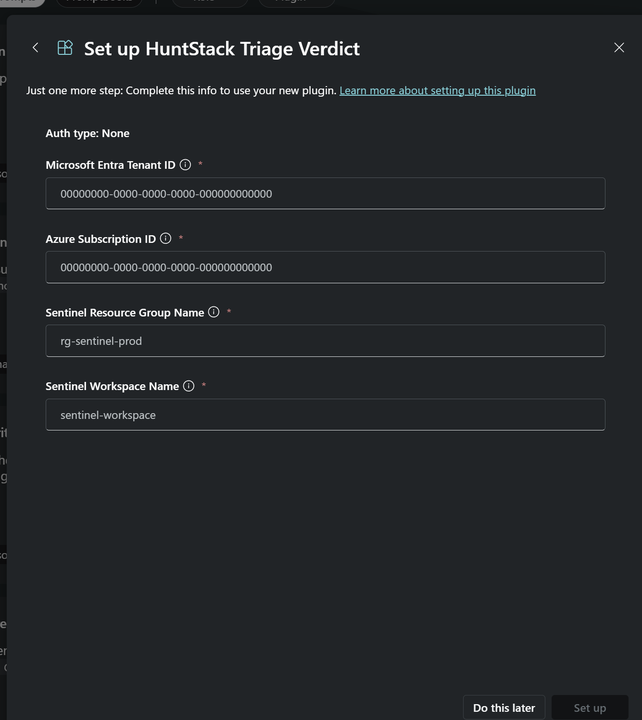
    In the Set up HuntStack Triage Verdict Agent panel, enter your Microsoft Entra Tenant ID, Azure Subscription ID, Sentinel Resource Group Name, and Sentinel Workspace Name, then select Set up. Auth type is None, so there are no secrets to paste on this panel — these four identifiers simply let the agent's read-only KQL skills query the right workspace.

    The Set up HuntStack Triage Verdict Agent settings panel showing the Microsoft Entra Tenant ID, Azure Subscription ID, Sentinel Resource Group Name, and Sentinel Workspace Name fields
  6. 06

    Deploy the Triage Verdict playbook and authorize Security Copilot

    Deploy the verdict playbook and its automation rule. Then open the deployed securitycopilot API connection in the playbook's resource group and select Edit API connection → Authorize → Save, signed in as a user with a Security Copilot role. The Security Copilot connector has no managed-identity option, so this one-time authorize is required — until it is done, no verdicts post.

[ VERIFY ]

Let a HuntStack rule fire, or seed a test incident. Once the runner posts its hunt comments, the incident should pick up an HS-VERDICT label and a single "HuntStack Triage Verdict" comment whose first line is the verdict JSON — with no analyst action at any point.

Plan and pricing

HuntStack Triage Verdict Agent consumes approximately 0.3–1.0 SCU per verdict, rising to about 1.5 SCU when post-triage persistence checks run.

  • Evidence gathering by the Triage Query Runner

    0 SCU — deterministic KQL, no Security Copilot involvement

  • Verdict on pre-gathered evidence (the autonomous path)

    ~0.3–1.0 SCU

  • Verdict plus post-triage persistence checks

    ~1.5 SCU

  • Interactive L1 investigation in chat

    ~0.5–2.0 SCU depending on depth

SCU (Security Compute Units) are billed by Microsoft Security Copilot at the workspace level.

Requirements

To deploy HuntStack Triage Verdict Agent into your Microsoft Security Copilot workspace you'll need:

  • Microsoft Security Copilot license with provisioned SCU capacity
  • A Microsoft Sentinel workspace — the agent reads SecurityIncident and SecurityAlert
  • HuntStack-deployed Sentinel analytic rules carrying their follow-up hunt queries
  • HuntStack Triage Query Runner playbook deployed in-tenant (gathers the evidence)
  • HuntStack Triage Verdict playbook deployed in-tenant (drives the agent unattended)
  • Microsoft Defender XDR Advanced Hunting for post-triage checks and the L1 toolkit
  • Optional, for full L1 toolkit depth: Microsoft Entra ID P2, Microsoft Defender for Identity, Microsoft Defender for Office 365, and Microsoft Defender for Cloud Apps with the Microsoft 365 connector — each skill simply returns nothing when its service is absent, by design